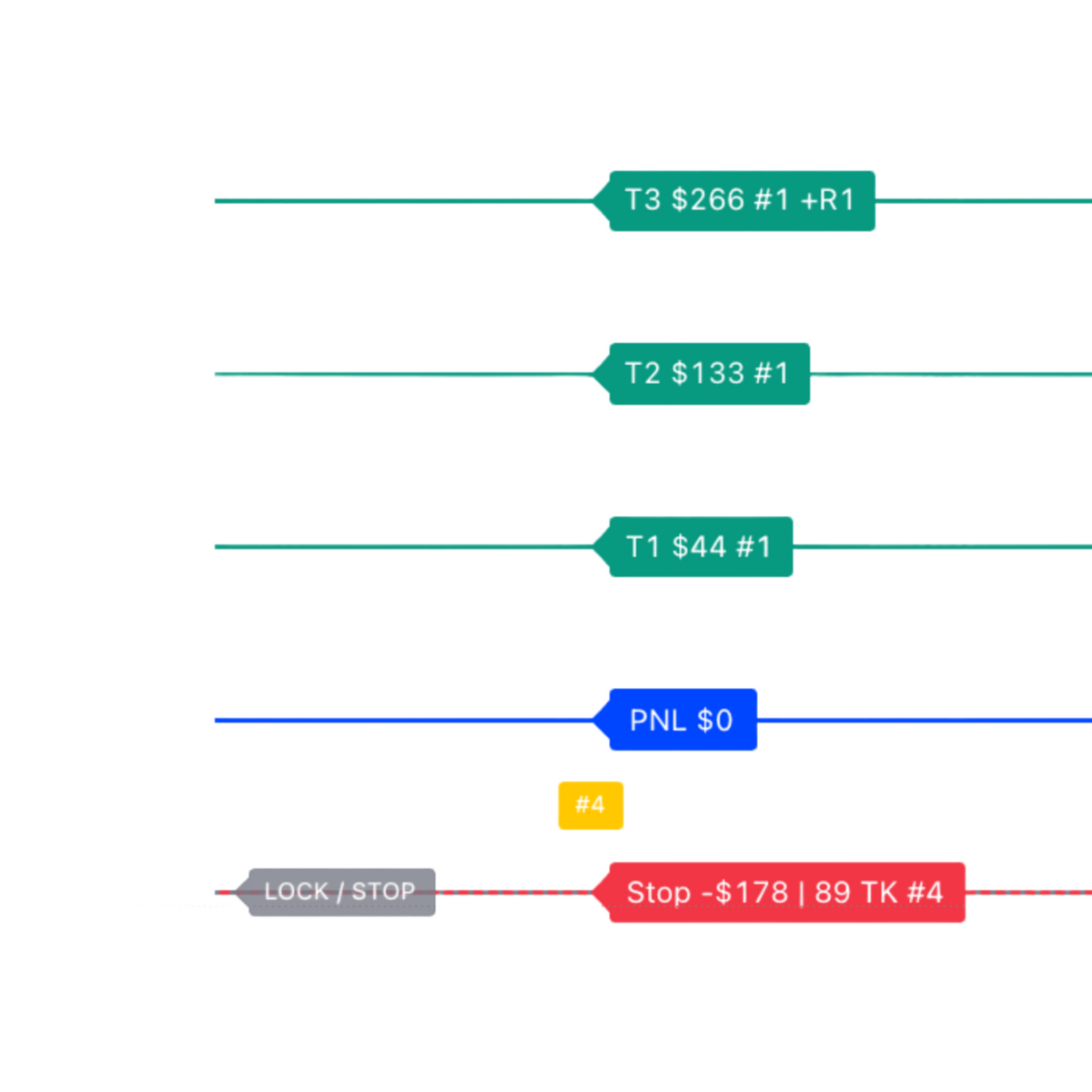
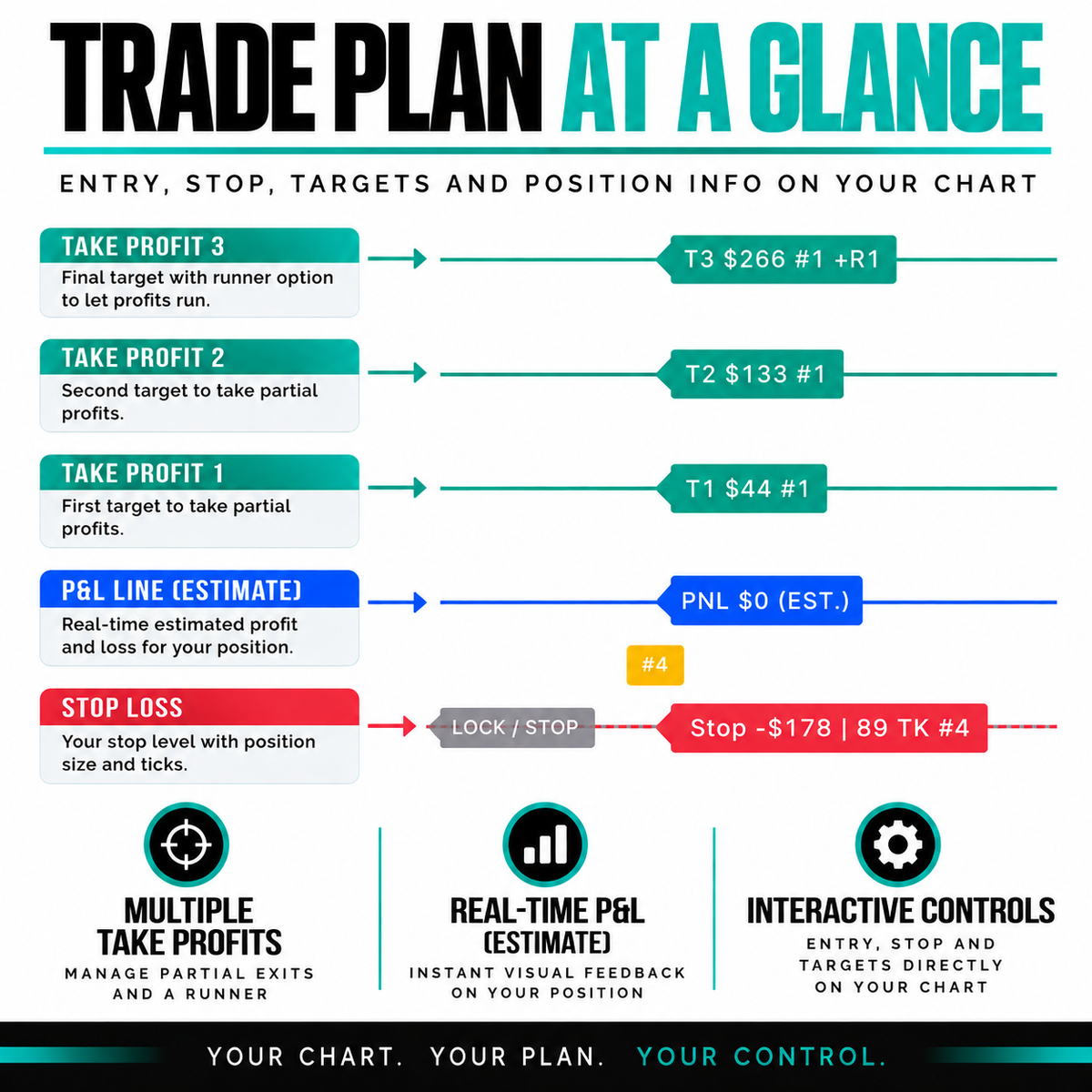
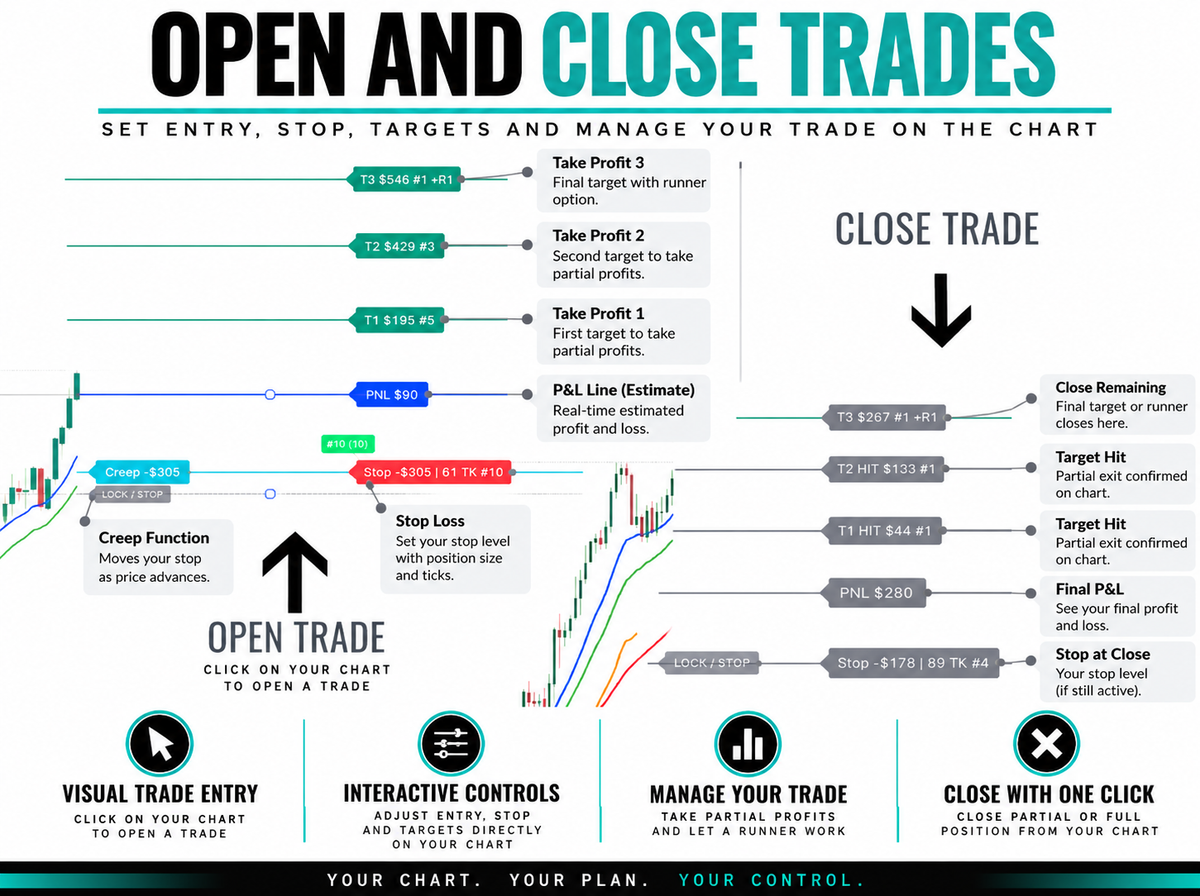
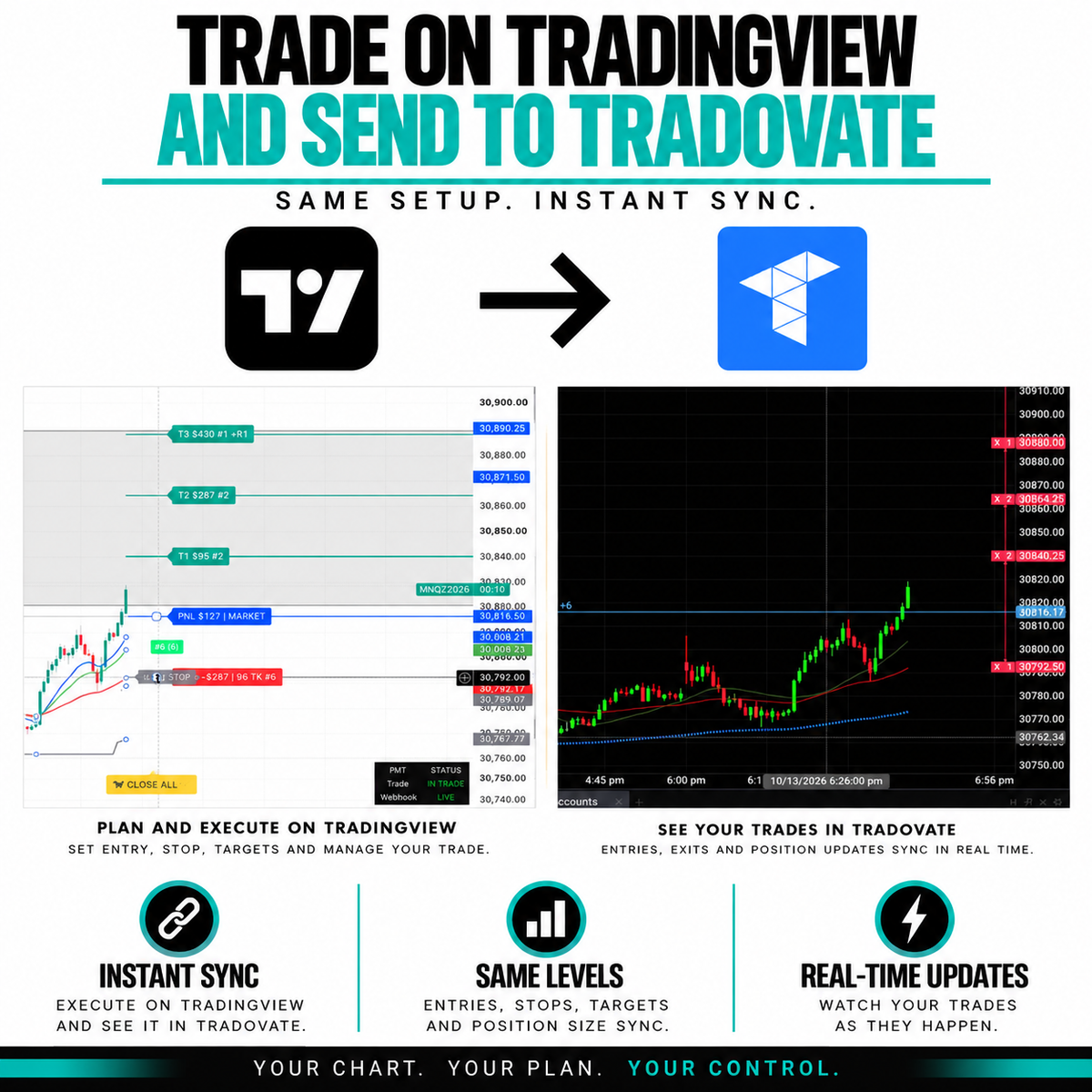
Freeballin Trade Manager
FREEBALLIN PRO
FREEBALLIN PRO
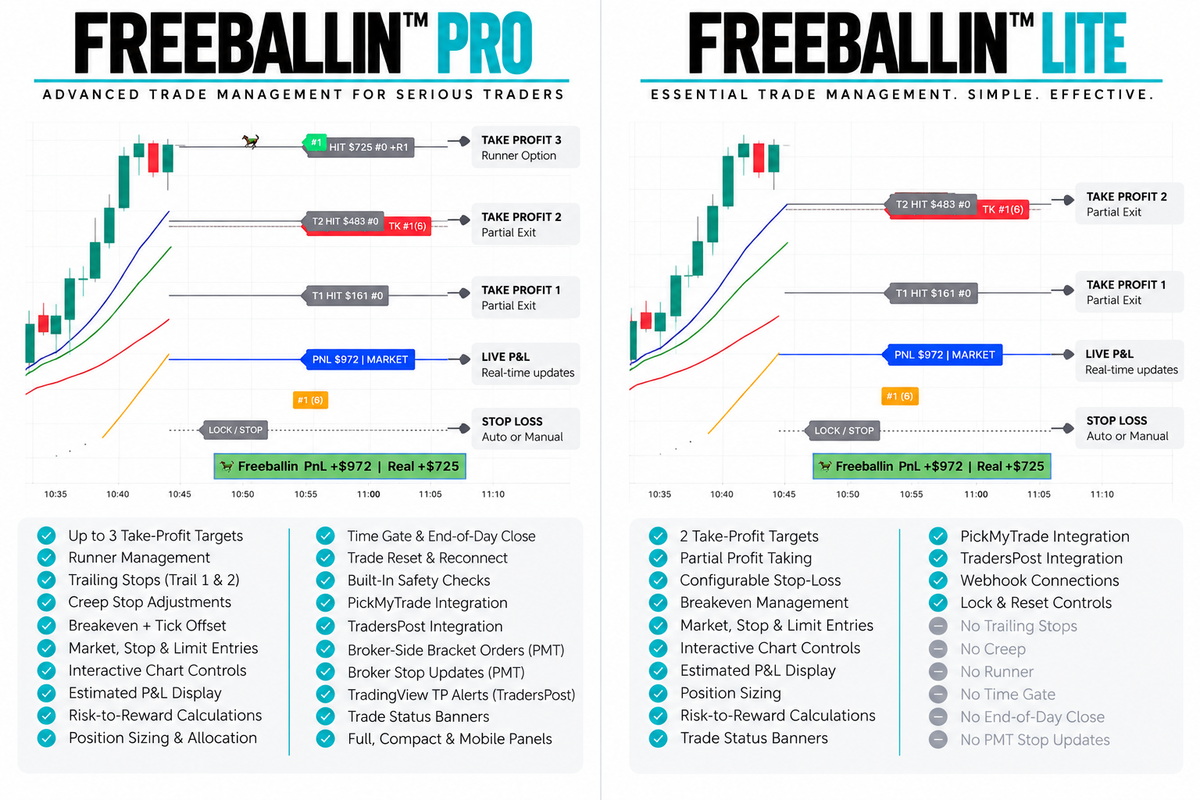
✔ 3 TPs + Runner
✔ Breakeven & BE+
✔ Configurable Stop-Loss
✔ Market, Stop & Limit
✔ Draggable Trade Levels
✔ Interactive Controls
✔ Close All
✔ PickMyTrade & TradersPost
✔ TradingView Alerts
✔ Futures & Tick Settings
✔ Manual & Adjust Mode
✔ Risk/Reward & Lock
✔ Entry & Stop Buffers
✔ Trail 1 & Trail 2
✔ MS, Tick & EMA Trails
✔ Creep & Jump
✔ PMT Dynamic Stop Updates
✔ TradersPost Visual Close
✔ Time Gate & EOD Close
✔ In-Trade Reconnect
✔ Custom Panels & Banners
✔ Built-In Safety Guards
FREEBALLIN LITE
FREEBALLIN LITE
✔ 2 Take Profits
✔ Breakeven After TP1
✔ PMT Breakeven Update
✔ Configurable Stop-Loss
✔ Market, Stop & Limit
✔ Draggable Trade Levels
✔ Interactive Controls
✔ Close All
✔ PickMyTrade & TradersPost
✔ TradingView Alerts
✔ Futures & Tick Settings
✔ Manual & Adjust Mode
✔ Risk/Reward & Lock
✔ Entry & Stop Buffers
✔ Custom Panels & Banners
✔ Built-In Safety Guards
✔ In-Trade Reconnect
❌ No Dynamic Trailing
❌ No Creep or Jump
❌ No Runner
❌ No Time Gate / EOD
❌ No Ongoing Stop Updates
THIRD-PARTY CONNECTION
🔗 THIRD-PARTY CONNECTION REQUIREMENTS
A TradingView subscription, compatible webhook provider (PickMyTrade or TradersPost) and supported broker account are required for connected trade execution. Third-party fees may apply.
Prop firm traders: Supported prop firm accounts using Tradovate may also connect through compatible integrations, subject to provider and prop firm compatibility.
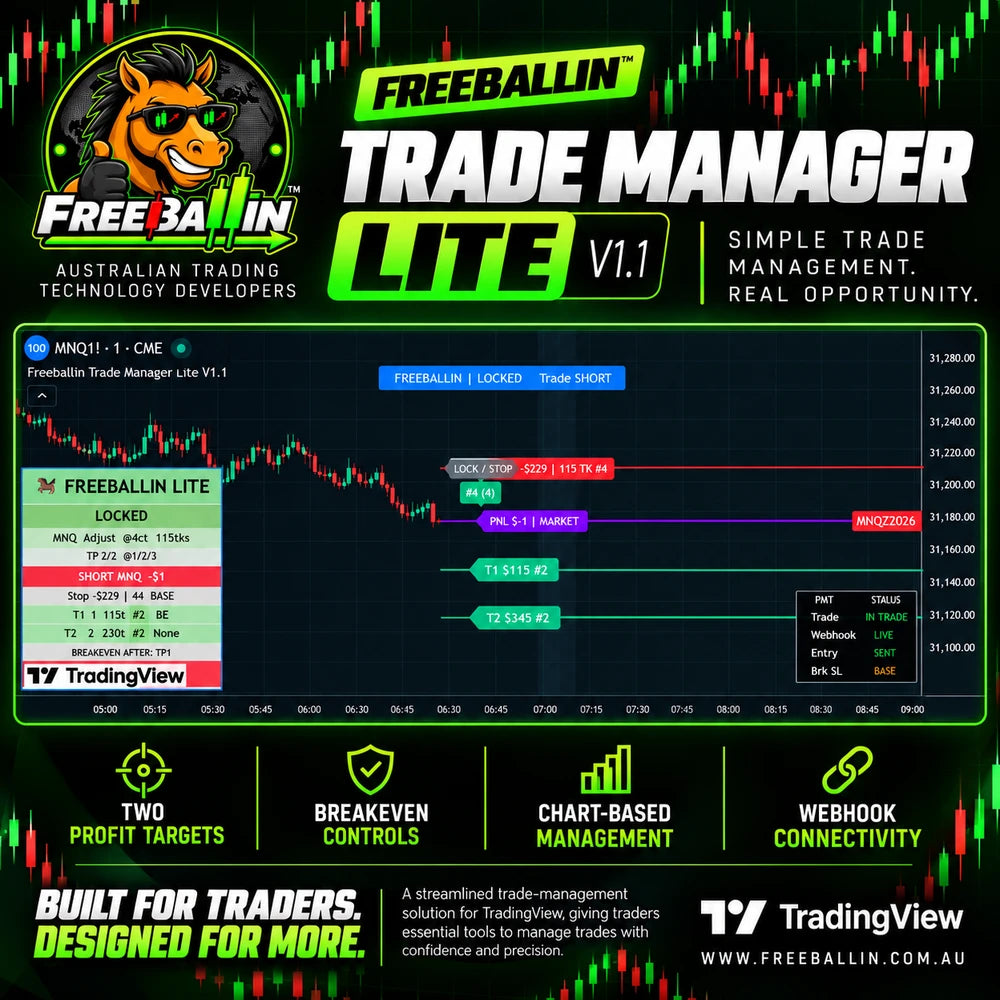
FREEBALLIN™ Trade Manager PRO & LITE are interactive TradingView indicators for futures traders, featuring configurable entries, multiple take-profit targets, breakeven and stop-loss management, all within your chart.
Couldn't load pickup availability
- Purchase
- Submit Username
- Access
INTERACTIVE TRADE MANAGEMENT
Manage trades directly on TradingView with draggable Entry, Stop-Loss and Take-Profit levels. Configure position sizing, risk and trade settings using Manual or Adjust Mode. YOU CHOOSE. YOU CONFIGURE. YOU INITIATE.
MULTIPLE TAKE PROFITS & BREAKEVEN
Set multiple Take Profits, allocate contracts and configure Breakeven. PRO: 3 Take Profits + Runner, Breakeven & BE+. LITE: 2 Take Profits, Breakeven after TP1 and one PickMyTrade stop update.
ADVANCED TRAILING & STOP MANAGEMENT
PRO ONLY: Configure Trail 1 & Trail 2, Market Structure, Tick and EMA trailing, plus Creep and Jump management. PickMyTrade supports dynamic broker-side stop updates. TradersPost uses TradingView-triggered visual close management.
FLEXIBLE ENTRY MODES
Choose Market, Stop or Limit entries. Configure Entry and Stop buffers, Risk/Reward and position sizing. Trade Lock, interactive controls and In-Trade Reconnect are available in both PRO & LITE.
THIRD PARTY INTEGRATION
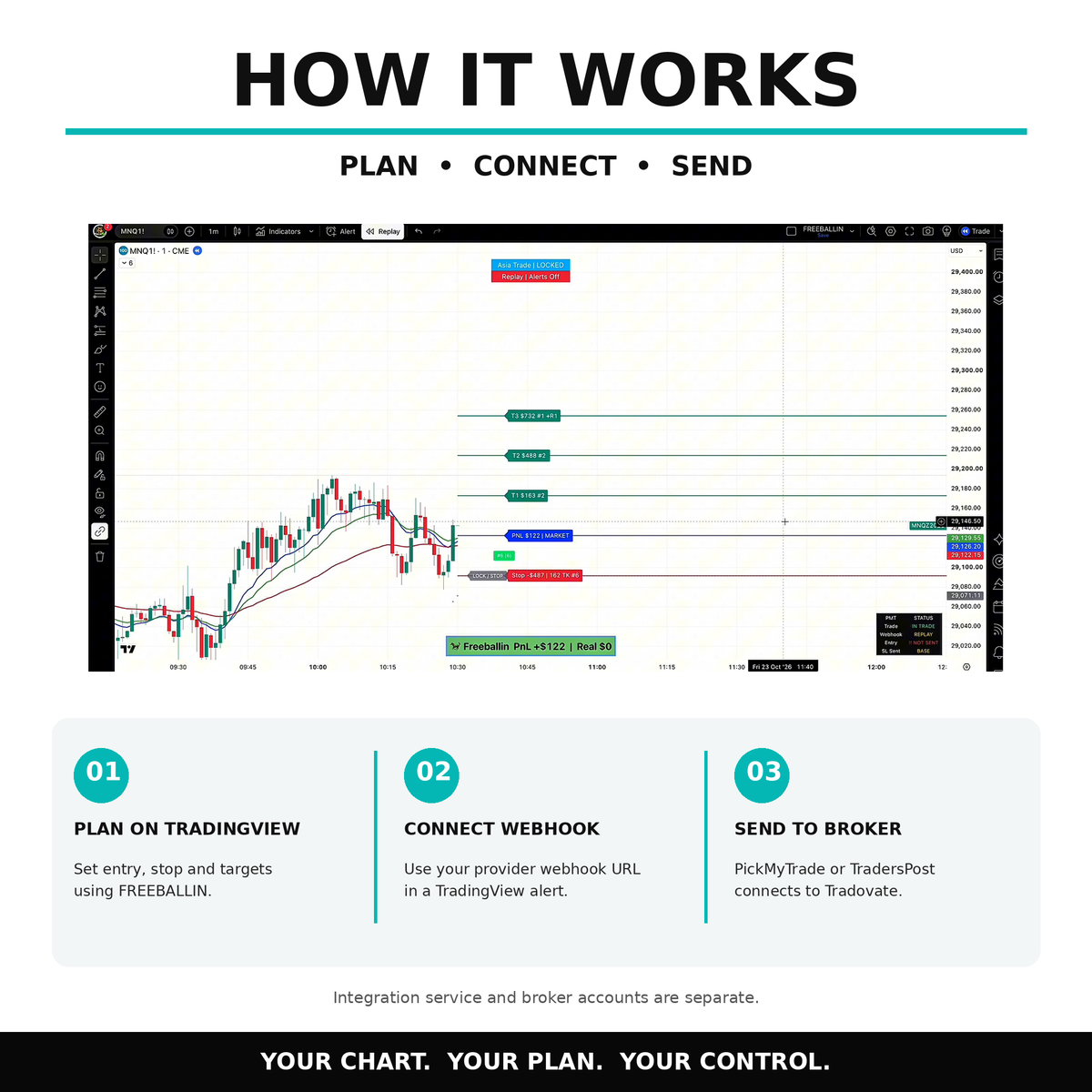
Connect TradingView to supported futures brokers through PickMyTrade or TradersPost. PickMyTrade supports applicable bracket orders and stop updates. TradersPost supports Entry and initial Stop instructions with TradingView-triggered Take-Profit and close requests. Third-party accounts and fees may apply.


Missing piece between entry and exit
STOP BABYSITTING YOUR CHARTS. 🐎
Meet FREEBALLIN™ Trade Manager — our flagship interactive TradingView indicator for futures traders, designed to simplify trade management in one customisable interface.
Configure your Entry, Stop-Loss, Take Profits, Breakeven and position sizing directly on your chart. Choose PRO for advanced trailing stops, Creep, Jump and Runner management, or LITE for essential trade management with two Take Profits and Breakeven.
Connect through PickMyTrade or TradersPost using TradingView alerts and webhooks to manage your trader-configured trades with compatible brokers.
YOU CHOOSE. YOU CONFIGURE. YOU INITIATE.
Freeballin Trade Manager
PRODUCT ACCESS
-
TRADE MANAGER PRO
✔ 3 TPs + Runner
✔ Breakeven & BE+
✔ Configurable Stop-Loss
✔ Market, Stop & Limit
✔ Draggable Trade Levels
✔ Interactive Controls
✔ Close All
✔ PickMyTrade & TradersPost
✔ TradingView Alerts
✔ Futures & Tick Settings
✔ Manual & Adjust Mode
✔ Risk/Reward & Lock
✔ Entry & Stop Buffers
✔ Trail 1 & Trail 2
✔ MS, Tick & EMA Trails
✔ Creep & Jump
✔ PMT Dynamic Stop Updates
✔ TradersPost Visual Close
✔ Time Gate & EOD Close
✔ In-Trade Reconnect
✔ Custom Panels & Banners
✔ Built-In Safety Guards -
TRADE MANAGER LITE
✔ 2 Take Profits
✔ Breakeven After TP1
✔ PMT Breakeven Update
✔ Configurable Stop-Loss
✔ Market, Stop & Limit
✔ Draggable Trade Levels
✔ Interactive Controls
✔ Close All
✔ PickMyTrade & TradersPost
✔ TradingView Alerts
✔ Futures & Tick Settings
✔ Manual & Adjust Mode
✔ Risk/Reward & Lock
✔ Entry & Stop Buffers
✔ Custom Panels & Banners
✔ Built-In Safety Guards
✔ In-Trade Reconnect
❌ No Dynamic Trailing
❌ No Creep or Jump
❌ No Runner
❌ No Time Gate / EOD
❌ No Ongoing Stop Updates -
USER ACCESS
YOUTUBETradingView Username is required for our Invite only indicators. Provide your TradingView username during or after checkout. Access is provided through TradingView's invite-only indicator once your purchase is verified within 12-24hrs and access is activated. Setup instructions and tutorials are available to help you get started on youtube.
HOW TO SET UP
Load the Trade Manager. Configure your position and trade-management settings. Create your TradingView alert. You’re ready to configure and initiate your trade. FREEBALLIN™ provides configurable TradingView alerts corresponding with your selected trade-management settings, with compatible third-party connectivity where enabled.
📈 PRO — Trail, Creep & Stop Updates
📈 The PRO
Advanced stop management with configurable Trailing Stops, Creep and Breakeven. Automatically send stop updates through PickMyTrade for all management, or use TradersPost for visual stop management with close/exit alerts.
⚙️ LITE — Breakeven & Stop Management
The LITE
Simple stop management with Breakeven after TP1. Supports 1 stop update through PickMyTrade and visual stop management with close/exit alerts through TradersPost. No Trailing Stops or Creep. Entry level.
Features
MANUAL & ADJUST TRADE CONTROLS
Configure Long or Short trades using Manual or Adjust Mode. Drag Entry, Stop-Loss and Take-Profit levels directly on your TradingView chart.
Available in PRO & LITE.
TAKE PROFITS & RUNNER
Configure multiple Take-Profit targets and allocate contracts across your selected levels.
PRO: 3 Take Profits + optional Runner.
LITE: 2 Take Profits, no Runner.
BREAKEVEN & STOP-LOSS
Configure your initial Stop-Loss and Breakeven settings.
PRO: Configurable Breakeven, BE+ and advanced stop management.
LITE: Breakeven after TP1, including one configured PickMyTrade broker-side stop update.
TRAIL 1 • TRAIL 2 • CREEP • JUMP
PRO ONLY: Configure Market Structure, Tick or EMA-based trailing with Trail 1 and Trail 2, Creep and Jump management.
PickMyTrade supports applicable dynamic stop updates. TradersPost uses TradingView-triggered close management.
MARKET • STOP • LIMIT ENTRIES
Choose Market, Stop or Limit entries with configurable Entry and Stop buffers. Adjust your trade levels before confirming and initiating your setup.
Available in PRO & LITE.
POSITION SIZING • RISK/REWARD • LOCK
Configure position size and contract allocation, review Risk/Reward calculations and confirm your Stop-Loss using Trade Lock.
Built-in safety guards help identify invalid setups.
Available in PRO & LITE.
PICKMYTRADE & TRADERSPOST CONNECTIVITY
PickMyTrade: Supports configured Entry, Stop-Loss and Take-Profit bracket instructions. PRO supports dynamic stop updates; LITE supports one Breakeven update after TP1.
TradersPost: Sends Entry and initial Stop instructions, with subsequent TradingView-triggered Take-Profit and close requests.
Third-party connectivity is required for broker integration.
TRADINGVIEW ALERTS & WEBHOOKS
Create TradingView alerts to communicate your configured trade-management events to supported third-party services.
FREEBALLIN™ prepares applicable webhook messages from your settings, reducing manual JSON configuration.
Available in PRO & LITE.
TIME GATE & END-OF-DAY CLOSE
PRO ONLY: Configure preferred entry windows with Time Gate and set End-of-Day Close conditions according to your selected schedule.
Execution depends on TradingView alerts and connected services.
IN-TRADE RECONNECT & SAFETY GUARDS
Restore applicable Trade Manager chart state after TradingView interruptions using previously confirmed trade settings.
Built-in safety guards help identify invalid configurations.
Always verify your live broker position and working orders after reconnecting.
Available in PRO & LITE.
CHART VISUALS & FUTURES SETTINGS
Customise your TradingView workspace with chart panels, banners, trade readouts and visual controls.
Configure supported futures assets, tick values and display preferences.
Available in PRO & LITE.
POSITION CLOSE MANAGEMENT
Manage trade closure through supported broker-side closing, configured stop-management exits and the separate FREEBALLIN™ Close Manager where applicable.
Always verify your broker position is flat and no unintended working orders remain before resetting.
Closing methods vary by integration and product.
Blog posts
View all-
TradingView Trade Management: Are You Managing ...
A Good Trade Starts With a PlanYou've identified your setup, checked your levels and decided where to enter.So far, so good, but have you planned what happens next?Where will you...
TradingView Trade Management: Are You Managing ...
A Good Trade Starts With a PlanYou've identified your setup, checked your levels and decided where to enter.So far, so good, but have you planned what happens next?Where will you...
-
Introducing FREEBALLIN
TradingView Trade Management & Trading TechnologyAustralian Trading Technology. Global Ambition.Built by Traders. Driven by Innovation.We Had a Problem. So We Built a Solution.Trading technology has come a long way. Today,...
Introducing FREEBALLIN
TradingView Trade Management & Trading TechnologyAustralian Trading Technology. Global Ambition.Built by Traders. Driven by Innovation.We Had a Problem. So We Built a Solution.Trading technology has come a long way. Today,...
-
How Many Indicators Do You Really Need?
Meet the FREEBALLIN Trade Toolkit: The only indicator you need for charting. Ever opened TradingView and realised you've got more indicators running than you can remember setting up? Moving averages,...
How Many Indicators Do You Really Need?
Meet the FREEBALLIN Trade Toolkit: The only indicator you need for charting. Ever opened TradingView and realised you've got more indicators running than you can remember setting up? Moving averages,...
CHECK OUT OUR INDICATORS
-
High quality
-
Invite Only
-
Youtube Videos
-
Here to help
FREQUENTLY ASKED
What is FREEBALLIN Trade Manager?
FREEBALLIN™ Trade Manager is a trader-configured trade-management tool for TradingView, designed for discretionary traders. You choose the trade, configure the applicable position and trade-management settings and initiate the workflow.
Is it an automated trading bot?
No. FREEBALLIN™ Trade Manager does not independently select trades, predict market direction, generate buy or sell signals, or decide which trades you should take. You choose, configure and initiate your trades.
How does it work?
You select the trade and configure the applicable entry, position, stop, target and optional trade-management settings in TradingView. FREEBALLIN™ then applies the selected trade-management functions according to the parameters you configure.
What can it manage?
Depending on your configuration, FREEBALLIN™ provides up to three configurable take-profit levels, breakeven, stop management, trailing, creep, runners, time controls and configurable TradingView alerts.
How does it connect to my broker?
Where enabled by the trader, configurable TradingView alerts may communicate trader-configured parameters or trade-management events to compatible third-party services using TradingView webhook functionality. Available functionality depends on the service, broker and configuration selected by the trader.
Does Freebalin Pty Ltd develop automated technology?
Yes. Freeballin Pty Ltd develops a range of trading technology, including manual trading tools and separately developed automated trading systems. The FREEBALLIN™ Trade Manager is a manual, trader-configured trade-management tool and should not be confused with FREEBALLIN's separate automated trading products.
Freeballin.com.au
Contact us teams@freeballin.com.au